Computer Workstations
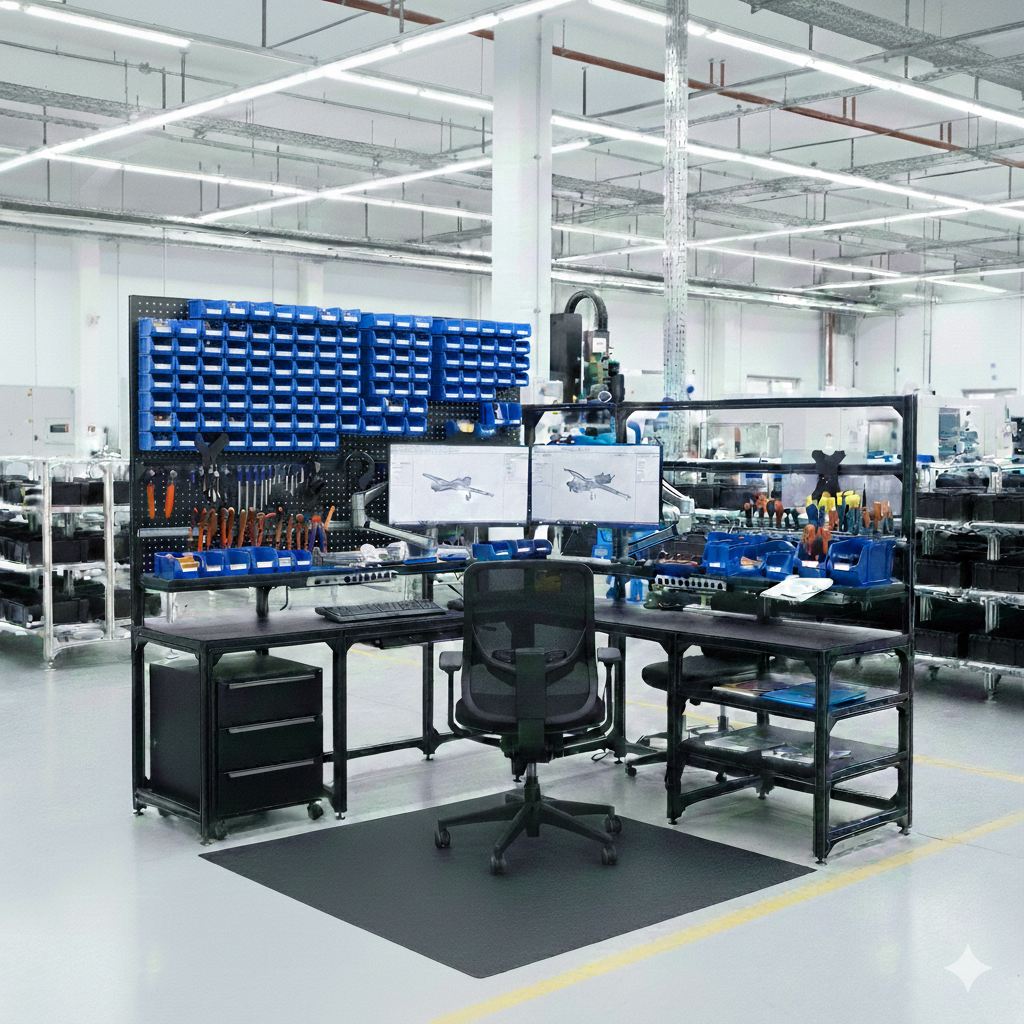
High-performance modular aluminum computer workstations engineered for multi-monitor, high-density, and high-uptime computing environments. Structured cable management, integrated power, monitor arm rails, and CPU tower management — every element built into the frame.
Why Choose Computer Workstations?
Computer workstations fail when the desk is an afterthought. Modular aluminum construction integrates cable management, power, monitor mounting, and equipment storage from the start — delivering clean, ergonomic, maintainable workstations.
Modular aluminum T-slot office furniture assembles without welding and reconfigures without tools — giving you a purpose-built workspace today that adapts through every headcount change, technology upgrade, and office reorganization without capital reinvestment in new furniture.
Monitor Rail System
Overhead horizontal rail accepts 1–6 monitor arms at any position with independent tilt, swivel, and height adjustment per arm.
In-Frame Power
Integrated power strips (8–12 outlet), USB-A/C charging, and dedicated circuit options supply clean, managed power at the workstation.
CPU Tower Management
In-frame CPU cradles mount tower computers off the floor, on a dedicated ventilated shelf inside the frame structure.
Structured Cable Routing
Vertical cable spines inside frame uprights and horizontal raceways under the surface route all cables from source to device invisibly.
Ergonomic Compliance
Surface height adjustment (fixed or sit-stand), monitor arm range, and keyboard tray options meet OSHA and NIOSH ergonomic guidance.
Benching Configuration
Adjacent workstations share uprights in a benching run, reducing material cost and floor footprint for open-plan computer labs.
Applications
Modular aluminum computer workstations are deployed in environments where computer density, uptime, and cable management are critical.
- Network operations center (NOC) workstations
- Call center and customer service agent stations
- Computer lab and training room installations
- Open-plan software development floors
- Security operations center (SOC) consoles
- Data entry and back-office processing stations
- Dispatch and transportation management
- Electronic health record (EHR) nursing stations
Specifications
Standard computer workstation configuration options.
| Parameter | Detail |
|---|---|
| Frame Material | Anodized aluminum T-slot extrusion, natural or black anodize |
| Monitor Capacity | 1–6 monitors per workstation (rail mount) |
| Power Integration | 8–12 outlet power strip; USB-A/C PD; 20A dedicated circuit option |
| CPU Management | In-frame ventilated CPU shelf or tower cradle |
| Surface Material | HPL standard; ESD-safe laminate option |
| Standard Widths | 48", 60", 72", 84" — custom widths available |
| Benching Span | 2–8 workstations per benching run on shared uprights |
| Lead Time | 3–5 weeks from approved drawings |
Frequently Asked Questions
Common questions about computer workstation cable management, power, and multi-monitor configurations.
How does structured cable management work in a computer workstation?
Cables from each device route into vertical cable spine channels inside the hollow aluminum frame uprights. At the work surface, cables exit through surface-level grommets or a rear cable chase. Power strips mount inside the horizontal frame channel under the surface. All channels open with a T-bolt for adds, moves, and changes without disturbing adjacent cables.
Can computer workstations be deployed in a benching configuration?
Yes. Adjacent workstations share center uprights in a benching run, reducing the number of frame components and floor footprint by 20–30% compared to individual freestanding desks. Benching runs from 2 to 8 positions are standard. Power is distributed from a single feed along the run with individual outlet strips at each position.
What CPU tower management options are available?
CPU towers mount on ventilated in-frame shelves inside the lower frame structure, lifting them off the floor and out of kick-space. This protects equipment from floor debris and flooding, improves front-panel access, and eliminates the tangled cable runs that result from floor-mounted towers. Sliding CPU platforms allow tower removal without moving the desk.
Are monitor arms compatible with all monitor sizes and weights?
Monitor arms are specified by monitor size and weight. Standard arms support 17"–32" monitors up to 17.6 lbs. Heavy-duty arms support 32"–49" ultrawide monitors up to 33 lbs. VESA 75×75 and 100×100 mount patterns are standard. Non-VESA monitors require an adapter bracket specified at order.
How are computer workstations wired for power?
A single power feed enters the benching run or individual workstation frame at a designated entry point. Power strips with individual circuit breakers distribute to each outlet. USB-C PD outlets (60W, 100W) for laptop docking mount at surface level. Optional 20A dedicated circuit provisions accommodate high-draw equipment.
Ready to Configure Your Computer Workstations?
Contact our workspace specialists for a no-obligation quote. We design, engineer, and manufacture modular office furniture from our Auburn Hills, MI facility — typically shipping in 2–4 weeks from approved drawings.
Request a Quote